> ## Documentation Index
> Fetch the complete documentation index at: https://developers.openborder.com/llms.txt
> Use this file to discover all available pages before exploring further.
# Label Compliance Integration
> The Label Compliance API enables clients to use their own shipping labels while ensuring international compliance with OpenBorder.
## Overview
The Label Compliance API enables clients to continue using their existing label generation workflows while leveraging OpenBorder to ensure international shipping compliance.
Designed for carriers, label providers, and other fulfillment partners, the API validates commercial invoice values, preserves HS codes from checkout through billing, and ensures shipments meet destination-country tax requirements using OpenBorder's Tax ID. This allows merchants to maintain a Delivered Duty Paid (DDP) experience while continuing to use their preferred shipping infrastructure.
Built to integrate seamlessly into existing label generation workflows, the API returns compliance results almost instantly, helping ensure duties and taxes are calculated correctly while reducing the risk of customs delays, billing discrepancies, and other cross-border compliance issues.
This integration is best suited for organizations that already generate shipping labels and require OpenBorder to provide the compliance information needed for international shipments.
## Workflow Example
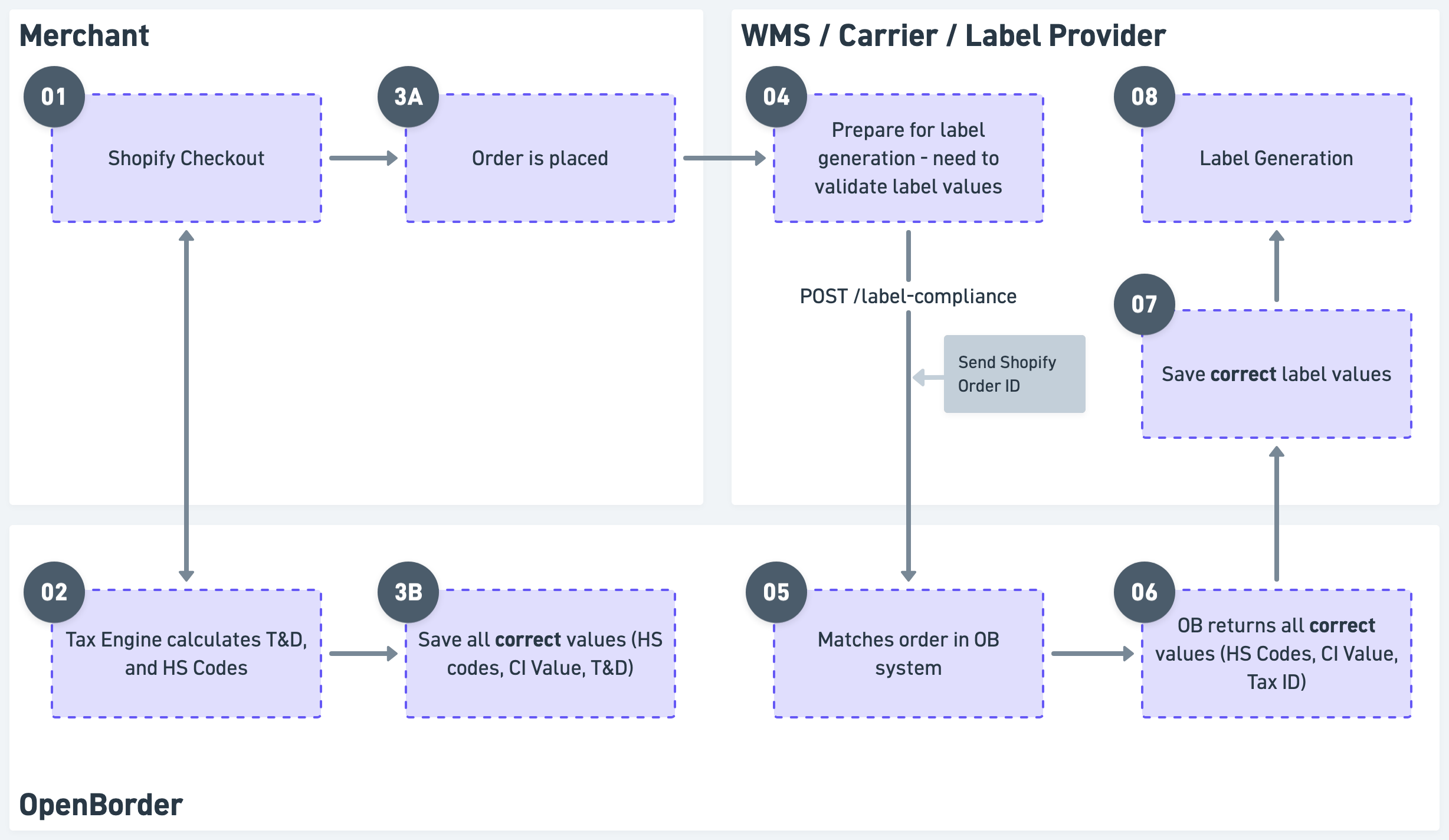
The Label Compliance API is designed to integrate directly into a client's existing label generation workflow. A typical implementation follows the steps below.
The merchant must have the OpenBorder Checkout Block installed on their e-commerce platform (e.g.,, Shopify, BigCommerce, etc.). This enables OpenBorder to calculate and display the correct duties and taxes during checkout.
When the customer proceeds to checkout, OpenBorder's Tax Engine calculates the applicable shipping costs, duties, and taxes for the order in real time.
After the customer places their order, the order is automatically ingested into the OpenBorder Order Management System (OMS), where all required compliance data is stored. This includes the commercial invoice value, product HS codes, duties, and taxes.
Before generating the shipping label, the client makes a single call to the Label Compliance API using the order ID. OpenBorder retrieves the corresponding order and returns the compliance data required for label generation, ensuring the shipment remains consistent with the duties and taxes calculated during checkout.
After receiving the compliance data, the client continues with its existing label generation workflow, using the values returned by OpenBorder to generate the final shipping label.
 ## Authentication
The Label Compliance API uses an API Key for authentication. A valid API key must be included in the `x-openborder-api-key` header of every request.
Production API credentials are provided by OpenBorder. To obtain a production API key, contact your OpenBorder representative.
For testing purposes, you may use the following sandbox API key:
```text theme={null} theme={null}
x-openborder-api-key: sk_896954b521a845c8-abd53ccb3d20d81c
```
In addition to the API key, each integration is assigned a unique **Partner ID**. This value must be included as the `partnerId` path parameter in every request so OpenBorder can identify your integration.
For testing purposes, use the following Partner ID:
```text theme={null} theme={null}
partnerId: obpartner
```
## Request
| Method | Endpoint |
| ------ | ---------------------------------------------------------------- |
| `POST` | `https://api.openborder.com/api/v1/{partnerId}/label-compliance` |
Replace `{partnerId}` with the Partner ID issued to you by OpenBorder.
### Merchant ID
Many OpenBorder clients manage multiple merchants or brands. Therefore, every request must include a unique merchant code in the `merchant_id` field.
Each merchant is assigned a unique Merchant ID by OpenBorder during onboarding. When a new merchant is onboarded, OpenBorder will provide the corresponding Merchant ID for use in API requests.
### Order References
When a request is made, OpenBorder must be able to match the order to the corresponding order in our system.
The API supports several order reference types. The two most commonly used identifiers are:
* **Shopify Order ID (`SHOPIFY_ORDER_ID`)** – The 13-digit numerical ID at the end of the Shopify order URL. For example, for the order:
```text theme={null} theme={null}
https://admin.shopify.com/store/samplemerchant/orders/7392874987713
```
the Shopify Order ID is:
```text theme={null} theme={null}
7392874987713
```
* **Shopify Order Number (`SHOPIFY_ORDER_NUMBER`)** – The customer-facing order number displayed at the top of the Shopify order page (for example, `#340056`).
### Example Request
```json theme={null} theme={null}
{
"merchant_id": "merchant_abc",
"order_references": [
{
"id": "4369721569321",
"type": "SHOPIFY_ORDER_ID"
}
],
"package": {
"parcel_items": [
{
"sku": "XYZ222",
"quantity": 1,
"unit_price": {
"amount": 50,
"currency": "USD"
},
"weight": {
"weight": 200,
"unit": "g"
},
"hs_code": 700239,
"country_of_origin": "CN",
"description": "A daily supplement",
"category": "Health & Supplements",
"url": "https://www.google.com"
}
],
"package_value": {
"amount": 50.0,
"currency": "USD"
},
"incoterm": "DDP",
"shipper_address": {
"vat": "",
"country_code": "US",
"city": "Los Angeles",
"province": "CA",
"postal_code": "90002",
"address1": "3245 Sunnyside Drive"
},
"destination_address": {
"vat": "",
"country_code": "GB",
"city": "London",
"province": "",
"postal_code": "W114UL"
}
}
}
```
## Response
Upon a successful request, the API returns the order's Commercial Invoice (CI) value, the HS codes for each SKU, the unit price for each SKU, and a Tax ID (when applicable).
```json theme={null} theme={null}
{
"label_compliance_request_id": "a98db93c-d90f-40f1-84e3-f2950485633a",
"ci_value": {
"amount": 100,
"currency": "USD"
},
"ci_value_price_set": {
"shop_money": {
"amount": 100,
"currency": "USD"
},
"presentment_money": {
"amount": 100,
"currency": "USD"
}
},
"order_total": {
"amount": 100,
"currency": "USD"
},
"tax_id": "GM123456789",
"parcel_items": [
{
"sku": "SKU-123",
"hs_code": "23456789",
"unit_price": {
"amount": 100,
"currency": "USD"
},
"unit_price_price_set": {
"shop_money": {
"amount": 100,
"currency": "USD"
},
"presentment_money": {
"amount": 100,
"currency": "USD"
}
}
}
]
}
```
In the event of an error, the API may return one of the following responses.
```json theme={null} theme={null}
{
"error": "An error describing why the request could not be validated or parsed.",
"label_compliance_request_id": "a98db93c-d90f-40f1-84e3-f2950485633a"
}
```
```json theme={null} theme={null}
{
"error": "Please verify that the API key matches the key provided for this environment.",
"label_compliance_request_id": "a98db93c-d90f-40f1-84e3-f2950485633a"
}
```
```json theme={null} theme={null}
{
"error": "The order could not be found. Please check the requested merchant_id or order_reference and try again.",
"label_compliance_request_id": "a98db93c-d90f-40f1-84e3-f2950485633a"
}
```
## Split Shipments
The Label Compliance API supports split shipments natively. This allows clients to request compliance data for partial fulfillments, where a single order is shipped across multiple packages and each package requires its own shipping label.
To create a split shipment, include only the SKUs and quantities that will be fulfilled in the current shipment. OpenBorder will automatically detect that the request represents a partial fulfillment and return:
* A prorated Commercial Invoice (CI) value for the shipment.
* A `parcel_items` array containing only the SKUs included in the request.
When implementing split shipments, keep the following in mind:
OpenBorder does **not** track the fulfillment status of an order or which SKUs have already been processed. It is the client's responsibility to track which items and quantities have been submitted for each shipment.
The Label Compliance API is idempotent, so repeated requests with the same payload will always return the same compliance values.
The `order_total` field returned in the response always represents the full order value (subtotal + shipping + duties + taxes).
This value is **not** prorated for split shipments and remains the same regardless of how many shipments are created.
## Testing
The following sandbox credentials can be used to test the Label Compliance API.
| Value | Test Credential |
| ---------------- | --------------- |
| Partner ID | `obpartner` |
| Merchant ID | `obdemo` |
| Shopify Order ID | `6721184661784` |
### Sample Request
```json theme={null} theme={null}
{
"merchant_id": "obdemo",
"order_references": [
{
"id": "6721184661784",
"type": "SHOPIFY_ORDER_ID"
}
],
"package": {
"parcel_items": [
{
"sku": "M18A",
"quantity": 1,
"unit_price": {
"amount": 76.24,
"currency": "CAD"
},
"weight": {
"weight": 1.09,
"unit": "g"
},
"hs_code": "23456789",
"country_of_origin": "US",
"description": "Leveled-up features include a sleek charging dock, a single attachable\ntrimming guard that allows you to explore 5 different hair lengths\nusing one tool, and an LED spotlight to easily groom to your",
"category": "Health & Beauty > Personal Care > Shaving & Grooming",
"url": "https://www.google.com"
}
],
"package_value": {
"amount": 76.24,
"currency": "CAD"
},
"incoterm": "DDP",
"shipper_address": {
"vat": "1234567890",
"country_code": "US",
"city": "New York",
"province": "NY",
"postal_code": "10001",
"address1": "123 Main St"
},
"destination_address": {
"vat": "9876543210",
"country_code": "CA",
"city": "Mississauga",
"province": "ON",
"postal_code": "L4V 1E6"
}
}
}
```
### Sample cURL
```bash theme={null} theme={null}
curl --location 'https://api.openborder.com/api/v1/obpartner/label-compliance' \
--header 'Content-Type: application/json' \
--header 'x-openborder-api-key: sk_896954b521a845c8-abd53ccb3d20d81c' \
--data @request.json
```
Replace the sample values with your production Partner ID, Merchant ID, and API key when moving to production.
## Authentication
The Label Compliance API uses an API Key for authentication. A valid API key must be included in the `x-openborder-api-key` header of every request.
Production API credentials are provided by OpenBorder. To obtain a production API key, contact your OpenBorder representative.
For testing purposes, you may use the following sandbox API key:
```text theme={null} theme={null}
x-openborder-api-key: sk_896954b521a845c8-abd53ccb3d20d81c
```
In addition to the API key, each integration is assigned a unique **Partner ID**. This value must be included as the `partnerId` path parameter in every request so OpenBorder can identify your integration.
For testing purposes, use the following Partner ID:
```text theme={null} theme={null}
partnerId: obpartner
```
## Request
| Method | Endpoint |
| ------ | ---------------------------------------------------------------- |
| `POST` | `https://api.openborder.com/api/v1/{partnerId}/label-compliance` |
Replace `{partnerId}` with the Partner ID issued to you by OpenBorder.
### Merchant ID
Many OpenBorder clients manage multiple merchants or brands. Therefore, every request must include a unique merchant code in the `merchant_id` field.
Each merchant is assigned a unique Merchant ID by OpenBorder during onboarding. When a new merchant is onboarded, OpenBorder will provide the corresponding Merchant ID for use in API requests.
### Order References
When a request is made, OpenBorder must be able to match the order to the corresponding order in our system.
The API supports several order reference types. The two most commonly used identifiers are:
* **Shopify Order ID (`SHOPIFY_ORDER_ID`)** – The 13-digit numerical ID at the end of the Shopify order URL. For example, for the order:
```text theme={null} theme={null}
https://admin.shopify.com/store/samplemerchant/orders/7392874987713
```
the Shopify Order ID is:
```text theme={null} theme={null}
7392874987713
```
* **Shopify Order Number (`SHOPIFY_ORDER_NUMBER`)** – The customer-facing order number displayed at the top of the Shopify order page (for example, `#340056`).
### Example Request
```json theme={null} theme={null}
{
"merchant_id": "merchant_abc",
"order_references": [
{
"id": "4369721569321",
"type": "SHOPIFY_ORDER_ID"
}
],
"package": {
"parcel_items": [
{
"sku": "XYZ222",
"quantity": 1,
"unit_price": {
"amount": 50,
"currency": "USD"
},
"weight": {
"weight": 200,
"unit": "g"
},
"hs_code": 700239,
"country_of_origin": "CN",
"description": "A daily supplement",
"category": "Health & Supplements",
"url": "https://www.google.com"
}
],
"package_value": {
"amount": 50.0,
"currency": "USD"
},
"incoterm": "DDP",
"shipper_address": {
"vat": "",
"country_code": "US",
"city": "Los Angeles",
"province": "CA",
"postal_code": "90002",
"address1": "3245 Sunnyside Drive"
},
"destination_address": {
"vat": "",
"country_code": "GB",
"city": "London",
"province": "",
"postal_code": "W114UL"
}
}
}
```
## Response
Upon a successful request, the API returns the order's Commercial Invoice (CI) value, the HS codes for each SKU, the unit price for each SKU, and a Tax ID (when applicable).
```json theme={null} theme={null}
{
"label_compliance_request_id": "a98db93c-d90f-40f1-84e3-f2950485633a",
"ci_value": {
"amount": 100,
"currency": "USD"
},
"ci_value_price_set": {
"shop_money": {
"amount": 100,
"currency": "USD"
},
"presentment_money": {
"amount": 100,
"currency": "USD"
}
},
"order_total": {
"amount": 100,
"currency": "USD"
},
"tax_id": "GM123456789",
"parcel_items": [
{
"sku": "SKU-123",
"hs_code": "23456789",
"unit_price": {
"amount": 100,
"currency": "USD"
},
"unit_price_price_set": {
"shop_money": {
"amount": 100,
"currency": "USD"
},
"presentment_money": {
"amount": 100,
"currency": "USD"
}
}
}
]
}
```
In the event of an error, the API may return one of the following responses.
```json theme={null} theme={null}
{
"error": "An error describing why the request could not be validated or parsed.",
"label_compliance_request_id": "a98db93c-d90f-40f1-84e3-f2950485633a"
}
```
```json theme={null} theme={null}
{
"error": "Please verify that the API key matches the key provided for this environment.",
"label_compliance_request_id": "a98db93c-d90f-40f1-84e3-f2950485633a"
}
```
```json theme={null} theme={null}
{
"error": "The order could not be found. Please check the requested merchant_id or order_reference and try again.",
"label_compliance_request_id": "a98db93c-d90f-40f1-84e3-f2950485633a"
}
```
## Split Shipments
The Label Compliance API supports split shipments natively. This allows clients to request compliance data for partial fulfillments, where a single order is shipped across multiple packages and each package requires its own shipping label.
To create a split shipment, include only the SKUs and quantities that will be fulfilled in the current shipment. OpenBorder will automatically detect that the request represents a partial fulfillment and return:
* A prorated Commercial Invoice (CI) value for the shipment.
* A `parcel_items` array containing only the SKUs included in the request.
When implementing split shipments, keep the following in mind:
OpenBorder does **not** track the fulfillment status of an order or which SKUs have already been processed. It is the client's responsibility to track which items and quantities have been submitted for each shipment.
The Label Compliance API is idempotent, so repeated requests with the same payload will always return the same compliance values.
The `order_total` field returned in the response always represents the full order value (subtotal + shipping + duties + taxes).
This value is **not** prorated for split shipments and remains the same regardless of how many shipments are created.
## Testing
The following sandbox credentials can be used to test the Label Compliance API.
| Value | Test Credential |
| ---------------- | --------------- |
| Partner ID | `obpartner` |
| Merchant ID | `obdemo` |
| Shopify Order ID | `6721184661784` |
### Sample Request
```json theme={null} theme={null}
{
"merchant_id": "obdemo",
"order_references": [
{
"id": "6721184661784",
"type": "SHOPIFY_ORDER_ID"
}
],
"package": {
"parcel_items": [
{
"sku": "M18A",
"quantity": 1,
"unit_price": {
"amount": 76.24,
"currency": "CAD"
},
"weight": {
"weight": 1.09,
"unit": "g"
},
"hs_code": "23456789",
"country_of_origin": "US",
"description": "Leveled-up features include a sleek charging dock, a single attachable\ntrimming guard that allows you to explore 5 different hair lengths\nusing one tool, and an LED spotlight to easily groom to your",
"category": "Health & Beauty > Personal Care > Shaving & Grooming",
"url": "https://www.google.com"
}
],
"package_value": {
"amount": 76.24,
"currency": "CAD"
},
"incoterm": "DDP",
"shipper_address": {
"vat": "1234567890",
"country_code": "US",
"city": "New York",
"province": "NY",
"postal_code": "10001",
"address1": "123 Main St"
},
"destination_address": {
"vat": "9876543210",
"country_code": "CA",
"city": "Mississauga",
"province": "ON",
"postal_code": "L4V 1E6"
}
}
}
```
### Sample cURL
```bash theme={null} theme={null}
curl --location 'https://api.openborder.com/api/v1/obpartner/label-compliance' \
--header 'Content-Type: application/json' \
--header 'x-openborder-api-key: sk_896954b521a845c8-abd53ccb3d20d81c' \
--data @request.json
```
Replace the sample values with your production Partner ID, Merchant ID, and API key when moving to production.